
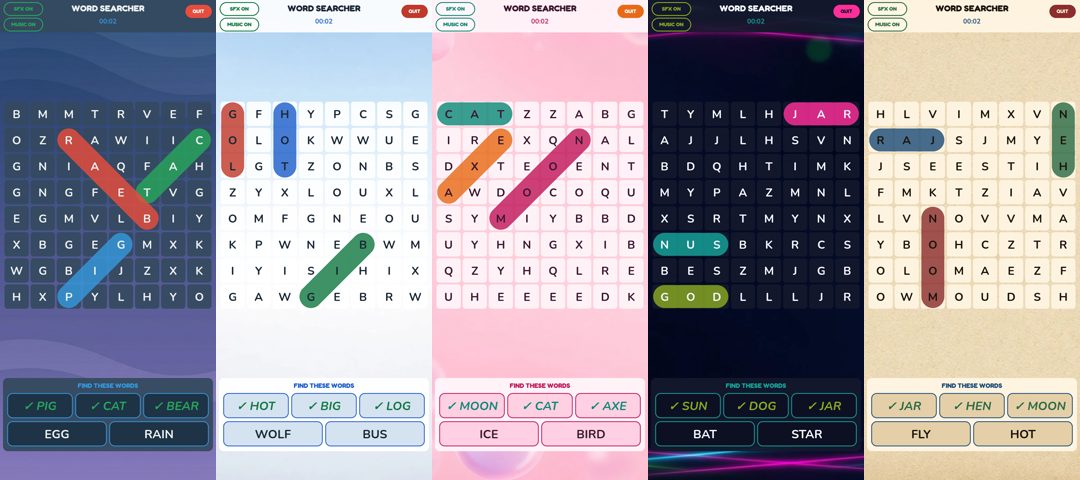
Fancy a new look for your favourite word search puzzle app? The latest Word Searcher Puzzle update from Chewy Games adds five selectable themes, so you can choose how every letter grid looks.
Pick the style that suits your mood, from the calm Night Blue board to a bright Light mode, a playful Bubble Pink, glowing Neon Lights or a classic Traditional Crossword look. Your choice applies instantly and is remembered next time you play.

Night Blue (default)
The calm dark board you already know. Night Blue stays the default, so nothing changes unless you want it to.

Light
Crisp white tiles on a pale blue background, a bright, clean look for daytime puzzling.

Bubble Pink
Soft pink bubbles behind the grid for a playful, cosy feel.

Neon Lights
Dark tiles with glowing pink and blue neon streaks, made for late-night word hunts.

Traditional Crossword
Cream, paper-style tiles on a newsprint background, a nod to the puzzle page in your favourite paper.

How to change your word search game theme
- Open Word Searcher Puzzle.
- Tap the new Settings button at the bottom of the home screen.
- Choose a theme. It applies straight away, and Word Searcher remembers it for your next game.

Get Word Searcher Puzzle on the App Store for iPhone and iPad:

Already playing? Update the app to try the themes. For screenshots and how-to-play notes, visit the Word Searcher Puzzle game page. You can also see all Chewy Games word games.
Looking for more? Browse our word search games guide or our pick of cosy word games to unwind with.
Version 1.0.7 also adds support for iOS 27, plus stability improvements.
Android players: Word Searcher Puzzle isn’t on Google Play yet. We’ll share an update as soon as the listing goes public.
Leave a Reply